
Baji App Download Bangladesh: Android and iOS Guide
Baji provides mobile access to sports betting and casino games through an Android application and an iPhone browser shortcut. The Baji app download Bangladesh guide explains installation, account access, navigation, security, and technical requirements. Android users install an APK package, while iPhone users open the platform through Safari and add its website to their home screen. Both approaches provide convenient access to the platform on a smartphone.
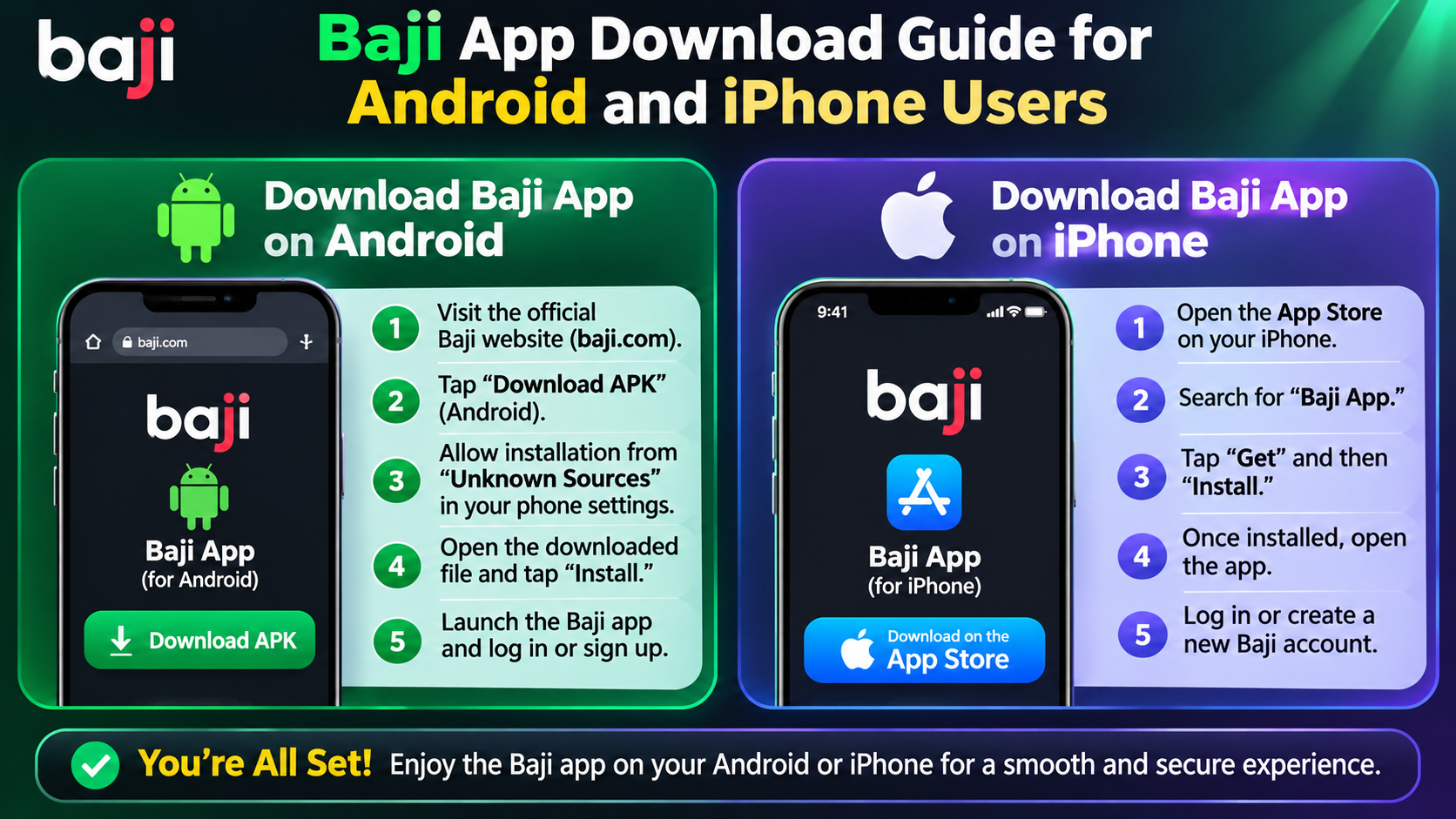 Baji Mobile App Overview
Baji combines a sportsbook, live betting markets, casino games, and account management in a compact mobile interface. The Android application places these services behind a dedicated icon, reducing the need to enter a website address for every session. Its navigation separates sports markets from casino entertainment, while the account area contains personal details, balance information, and transaction records.
How to Download Baji on Android
Android users obtain the Baji installation package from the platform’s official download section. The APK format installs the application directly onto the phone rather than requiring a listing in Google Play. Before beginning, the device needs a working internet connection and sufficient free storage.
The installation follows a short sequence. The browser’s installation permission applies specifically to the application used to open the downloaded file.
- Open the official website. Launch Chrome or another browser on the Android phone and locate the Baji application download section.
- Download the APK. Select the Android download option and wait until the package appears in the device’s Downloads folder.
- Grant installation permission. Open the downloaded file and follow Android’s prompt to allow that browser or file manager to install an application.
- Install the application. Review the installation prompt, confirm the action, and wait for the Baji icon to appear.
- Open Baji. Launch the application, enter existing account credentials or proceed to the registration screen, and verify that the interface loads correctly.
- Restore the security setting. Return to Android settings and revoke the temporary permission to install applications from that source.
The download process should be completed before any account activity begins. Keeping the installer in the Downloads folder also makes it easier to identify the exact package used during setup. After installation, the file itself is no longer needed for everyday access to the service.
Android labels vary between device manufacturers. The relevant permission appears under settings such as Install unknown apps or Special app access. Granting it to a single trusted browser is more controlled than enabling broad installation permissions for unrelated applications.
How to Access Baji on iOS
Baji does not provide a confirmed dedicated iPhone application for this version of the platform. iPhone users instead access its smartphone website through Safari and create a home screen shortcut. This arrangement avoids third-party installation profiles and keeps the platform accessible from an icon alongside other applications.
Safari supplies the home screen function directly. The procedure creates a shortcut to the website, not a native iOS application downloaded from the App Store.
- Open Safari. Visit the official Baji website on the iPhone and wait for the main page to finish loading.
- Find the Share control. Tap Safari’s Share icon and open the available page actions.
- Select Add to Home Screen. Choose the home screen option, then review the shortcut name displayed by iOS.
- Confirm the shortcut. Tap Add to place the Baji icon on the iPhone’s home screen.
- Launch the platform. Open the new icon and sign in through the website’s mobile interface.
The shortcut opens the platform through its web interface. Website updates therefore appear without a separate APK replacement or App Store installation. Access still requires an active internet connection, and browser privacy settings influence the persistence of login sessions.
Android and iPhone Access Compared
The Android APK and Safari shortcut serve the same central purpose but use different installation methods. Android places a software package on the device, while iOS saves a website entry point. This distinction matters when users troubleshoot updates, permissions, and storage consumption.
An Android installation occupies application storage and maintains its own cached files. A Safari shortcut relies on browser technologies and website data. Removing the Android application deletes its local installation, whereas deleting the iPhone shortcut removes the icon without deleting the account held on Baji’s servers.
Device Requirements and Internet Connection
The Android application requires an Android smartphone capable of opening and installing its current APK package. Available storage must cover both the downloaded file and the installed application’s working data. A device running out of space during installation displays an error or fails to complete the process.
For iPhone access, Safari and a supported iOS version provide the required browser functionality. No APK file is involved. A functioning home screen shortcut also relies on the website remaining accessible and the device retaining its browser settings.
Stable connectivity is important for live markets. Odds change during an event, and a weak connection interrupts the exchange of updated prices and bet confirmations. Wi-Fi and mobile data both provide access. A stronger connection also improves the loading of graphics, video feeds, and live dealer streams.
Registration and Account Login
The application uses the same Baji account as the website. Existing users sign in with their registered credentials and reach the account area without opening another profile. New users complete the registration process before accessing real-money services.
Registration collects the identifying and contact information required to establish an account. The user sets a password and confirms the requested details through the registration interface. Accurate information matters because identity verification and payment ownership checks rely on consistency between account records and supporting documents.
After signing in, the account dashboard displays available balance information and links to betting history, deposits, withdrawals, and profile controls. Users should sign out on shared devices and avoid saving credentials in an unsecured browser.
Sports Betting Features on Mobile
The mobile sportsbook organizes events by sport, competition, and scheduled starting time. Cricket and football are prominent categories, supported by additional sports and live markets. Each event page contains selectable odds and betting options.
A selection enters the bet slip, where the stake and projected return are displayed before confirmation. Decimal odds express the total potential return relative to the stake, including the original amount. The final confirmation screen establishes the wager and its accepted price.
Live betting operates during matches. Markets react to goals, wickets, penalties, and other developments, so the displayed price changes as events unfold. A suspended market temporarily prevents new selections until betting resumes.
The bet history area records accepted wagers and their settlement status. Checking this record is more reliable than treating a loading animation as proof of successful placement. Users should verify the confirmed stake and selection before leaving the bet slip.
Casino Games and Mobile Navigation
Baji’s casino area brings slot titles and live dealer games into the smartphone interface. Category menus organize available entertainment and help users locate a preferred game without searching the entire catalogue manually. Game tiles open the corresponding betting screen.
Slots present their own reels, betting controls, and paytables. The game information screen contains rules and payout details, including the treatment of bonus symbols and special features. Individual game outcomes remain random and cannot be predicted from previous spins.
Live dealer tables connect the player to a streamed gaming session. Controls for stake selection and participation appear beside the video area, with the exact layout adjusted to the phone’s screen. A stable connection helps maintain uninterrupted access to the session.
Deposits and Withdrawals in the App
The account cashier provides access to deposits and withdrawal requests. Baji supports payment workflows using familiar local payment services, including bKash and Nagad, alongside the options displayed in the cashier. Available limits and transaction instructions appear during the selected payment process.
A deposit starts by choosing a payment channel and entering an amount. The payment service then handles the required authorization, after which the account balance reflects the completed transaction. A pending transaction should be checked in the payment history before another payment is submitted.
Withdrawals require the account holder to select an available payout method and provide the requested payment details. Identity checks protect the account against unauthorized cash-outs. The payment destination must belong to the verified account holder.
Application Updates and Maintenance
Android updates replace the installed application package with a newer compatible release. Users should return to the designated Baji download section for the latest APK rather than searching unofficial file repositories. Keeping the application current supports compatibility with changes to the platform’s services.
On iPhone, the home screen shortcut follows the website’s current interface. Safari itself receives updates through iOS software maintenance. Removing and recreating the shortcut resolves problems caused by an outdated saved page address.
Android users can clear the application’s cache through device settings when menus stop loading correctly. Clearing application data is a more extensive action and removes locally stored settings and login sessions. Restarting the phone and checking connectivity are sensible first troubleshooting steps.
Security and Responsible Account Use
The application handles personal details, login credentials, and payment information, making device security important. A strong unique password reduces the risk of unauthorized access. Device screen locks and available account verification controls provide additional protection.
Users should inspect download addresses carefully and reject messages requesting passwords or verification codes. Installing unrelated software presented as a mandatory Baji update creates avoidable exposure. An unexpected login alert or unfamiliar transaction requires immediate attention through the account’s security and support functions.
Baji is intended for adults aged 18 and above. Betting involves financial risk, and neither sports analysis nor casino game selection guarantees winnings. Account holders should establish spending limits and avoid using money reserved for essential expenses.
Troubleshooting Download and Access Problems
A failed Android installation has several identifiable causes. Insufficient storage, a corrupted download, an incompatible package, or missing installation permission can stop the setup process. Deleting the incomplete APK and downloading a fresh copy addresses damaged files.
An application that opens but does not load its content requires a separate check. The device’s connection, background data restrictions, and application cache influence loading. Repeated login failures require credential recovery rather than further installation attempts.
On iPhone, a missing Add to Home Screen command is resolved through Safari’s page actions and customization controls. A shortcut that opens an old address can be deleted and recreated from the current website. Browser data restrictions can also cause unexpected sign-outs.
Customer Support for Mobile Users
Baji’s support channels address download errors, account recovery, installation difficulties, payment questions, and problems with betting records. The support entry point is accessible through the platform’s help or contact area.
Technical reports benefit from the Android version, application version, device model, and approximate time of the failure. For iPhone shortcuts, the iOS version and Safari behavior provide more relevant information than an APK version number.
Payment inquiries require the transaction reference and the affected account, while betting inquiries require the event, market, stake, and settlement details. Clear information helps support staff distinguish a device problem from an account or transaction issue.

Basanti Brahmbhatt
Basanti Brahmbhatt is the founder of Shayaristan.net, a platform dedicated to fresh and heartfelt Hindi Shayari. With a passion for poetry and creativity, I curates soulful verses paired with beautiful images to inspire readers. Connect with me for the latest Shayari and poetic expressions.


