
5 Best Samsung Tablets for Drawing: Buying Guide
for Digital Art
For digital illustrators, animators, and concept designers, migrating from traditional desktop graphics setups toward a fully portable workflow offers incredible creative freedom. Android devices equipped with pressure-sensitive styluses, vibrant displays, and rich brush engines have grown into dependable creative hubs. When artists evaluate options for the best Android standalone drawing tablet, Samsung’s Galaxy series frequently leads the shortlist thanks to built-in Wacom EMR digitizers and included S Pens.
Finding the best Samsung tablet for drawing requires assessing several critical technical variables, including screen real estate, pen activation force, memory bandwidth for complex layer stacks, and real-world thermal management. In this guide, we review top Samsung tablets across various budgets, analyze their core specifications, highlight an art-focused hardware alternative, and answer key questions every artist should consider before buying.
Quick Review: Samsung Tablets Comparison Table
To compare core specs at a glance, here is a breakdown of key models when deciding on the best Samsung tablet for drawing for your digital studio:
| Tablet Model | Display Specifications | Weight | Core Processor | Memory and Storage | Price Range |
| Galaxy Tab S11 Ultra | 14.6 Inch Dynamic AMOLED 2X, 120Hz | ~1.53 lbs (695g) | MediaTek Dimensity 9400+ (3nm) | 12GB to 16GB RAM / Up to 1TB | ~$1,300+ |
| Galaxy Tab S10 Ultra | 14.6 Inch Dynamic AMOLED 2X (Anti-reflective, 120Hz) | ~1.6 lbs | MediaTek Dimensity 9300+ | 12GB to 16GB RAM / Up to 1TB | ~$1,200+ |
| Galaxy Tab S10+ | 12.4 Inch Dynamic AMOLED 2X (Anti-reflective, 120Hz) | ~1.27 lbs (571g) | MediaTek Dimensity 9300+ | 12GB RAM / Up to 512GB | ~$1,100+ |
| Galaxy Tab S9 Ultra | 14.6 Inch Dynamic AMOLED 2X, 120Hz | ~1.62 lbs (732g) | Snapdragon 8 Gen 2 | Up to 16GB RAM / 1TB | ~$1,200+ |
| Galaxy Tab S6 Lite (2024) | 10.4 Inch TFT LCD, 60Hz | ~1.025 lbs (465g) | Exynos 1280 Octa-Core | 4GB RAM / Up to 128GB | ~$279 to $350+ |
Why Have Samsung Tablets Become a Popular Choice for Artists?
Over recent years, Samsung’s Galaxy Tab lineup has earned a dominant reputation in digital art communities. Creators looking for the best Samsung tablet for drawing usually point to three key technical advantages:
Battery-Free Electro-Magnetic Resonance (EMR) Stylus
Unlike styluses that demand Bluetooth pairing or internal battery charging, the S Pen uses electromagnetic resonance driven directly by the tablet digitizer. This means zero pen battery anxiety, lightweight pen barrels, 4096 pressure levels, 60-degree tilt recognition, and zero pen charging downtime.
High-Fidelity Color Accuracy and Deep Contrast
Flagship Galaxy tablets use AMOLED panels capable of displaying deep blacks, high contrast ratios, and broad color space coverage (100% DCI-P3). This ensures that comic colorists, concept artists, and graphic designers see accurate color values that align with final print and web exports. This allows comic colorists, concept artists, and graphic designers to achieve consistent color reproduction for both print production and online publishing.
DeX Mode & Flexible Multi-Window Workflows
Samsung’s software interface makes multitasking straightforward. Artists can keep Clip Studio Paint or Krita open on one side of the display while keeping reference boards or video tutorials open on the other. Activating Samsung DeX shifts the tablet interface into a desktop-like environment suitable for multi-monitor setups.
5 Best Samsung Tablets for Drawing: Professional Review
Samsung Galaxy Tab S9 Ultra
Overall best Samsung tablet for drawing for Studio Work
Price Range: ~$1,200+
Starting around $699 with aggressive trade-ins and ranging up to $1,399 MSRP, the Samsung Galaxy Tab S9 Ultra provides an expansive mobile canvas. The box includes an S Pen and essential hardware like a USB-C charging cable and a quick-start guide. While popular across general consumer markets, professional designers and illustrators gravitate toward the S9 Ultra as the best Samsung tablet for drawing when maximum screen real estate is required.
Key Specifications:
- Display: 14.6-inch Dynamic AMOLED 2X, 2960 × 1848 resolution
- Processor: Snapdragon 8 Gen 2
- Battery: 11,200 mAh
- Storage: Up to 1TB internal storage, with microSD expansion support
- Weight: 1.62 lbs (732 g)
Our Review:
If you are a professional designer working with high-DPI artwork or detailed creative pursuits, this is the best Samsung tablet on the market. It combines a smooth and precise pen experience with plenty of battery life and advanced color accuracy.
Buy if
You require a larger screen for shared reference windows or need higher color accuracy for commercial production.
Don’t buy if
You are on a strict budget or want a compact form factor to fit easily into small bags.
Samsung Galaxy Tab S10+
Best Balance of Performance and Canvas Size
Price Range: ~$1,100+
For artists who find 14.6 inches too unwieldy for handheld sketching or outdoor travel, the 12.4-inch Galaxy Tab S10+ represents an ideal middle ground, making it a strong contender for the best Samsung tablet for drawing.
Key Specifications:
- Display: 12.4-inch Dynamic AMOLED 2X anti-reflective display, 2800 × 1752 resolution
- Processor: MediaTek Dimensity 9300+
- Refresh Rate: 120Hz
- Storage: Up to 512GB, with expandable storage support
- Weight: 1.27 lbs (571 g)
Our Review:
The Tab S10+ hits a sweet spot between raw processing speed, anti-glare screen technology, and comfortable handheld portability. It handles heavy brush engines in drawing applications without stuttering.
Buy if:
You want flagship AMOLED color depth in a backpack-friendly form factor.
Don’t buy if:
You want an ultra-cheap entry-level sketchpad.
Samsung Galaxy Tab S11 Ultra
Uncompromised Flagship Workstation
Price Range: ~$1,300+
For creators who demand the absolute latest hardware performance, the Galaxy Tab S11 Ultra delivers top-tier speed and canvas space, solidifying its rank as a best Samsung tablet for drawing.
Key Specifications:
- Display: 14.6-inch Dynamic AMOLED 2X with a 120Hz refresh rate
- Processor: MediaTek Dimensity 9400+ (3nm)
- RAM: Up to 16GB
- Storage: Up to 1TB internal storage, with microSD expansion support up to 2TB
- Weight: Approximately 1.53 lbs (695 g)
Our Review:
This flagship workstation effortlessly manages high-resolution canvases containing over 100 layers in apps like Infinite Painter or Clip Studio Paint. Its high pixel density keeps linework razor-sharp.
Buy if:
You demand top-tier processing power, maximum RAM for heavy files, and an expansive canvas.
Don’t buy if:
You prefer a lightweight, compact device for one-handed sketching.
Samsung Galaxy Tab S10 Ultra
High-End Large Canvas Alternative
Price Range: ~$1,200+
The Galaxy Tab S10 Ultra remains a powerful large-format choice for digital painters, holding its place as a best Samsung tablet for drawing option.
Key Specifications:
- Display: 14.6-inch Dynamic AMOLED 2X anti-reflective display with a 120Hz refresh rate
- Processor: MediaTek Dimensity 9300+
- RAM: Up to 16GB
- Storage: Expandable storage up to 1TB
- Weight: Approximately 1.6 lbs
Our Review:
Equipped with an anti-reflective screen coating, this model minimizes glare under bright studio lighting or sunlight, allowing artists to work comfortably in various environments.
Buy if:
You work on large-scale illustrations and frequently sketch near bright windows or outdoors.
Don’t buy if:
You want a small, highly portable sketchpad under 11 inches.
Samsung Galaxy Tab S6 Lite (2024 Edition)
Best Budget Choice for Beginners
Price Range: ~$350+
The beauty of the Samsung Galaxy Tab S6 Lite (2024) is the price point. You can easily find this little power-packed device anywhere from $279 to $349. At a mobile-friendly 10.4 Inch screen, complete with an S Pen and charger, you get a much more realistic price point that is perfect for new artists wanting to develop skills before making a significant investment.
Key Specifications:
- Display: Up to 10.4-inch TFT display with a 2000 × 1200 resolution and 60Hz refresh rate
- Processor: 2.4GHz Exynos 1280 octa-core processor
- Battery: 7,040 mAh, offering up to approximately 14 hours of video playback
- Storage: 64GB or 128GB internal storage, with microSD expansion up to 1TB
- Weight: 1.025 lbs (465 g)
Our Review:
If you’re looking for the best Samsung tablet for drawing that allows complete mobile versatility, this is it. The S6 Lite is perfect for beginners or hobbyists just starting out in the animation, art, and design worlds.
Buy if:
You don’t want to spend a lot of money, need a small form factor that is easy to carry, or are brand new to the creative space.
Don’t buy if:
You require a much larger screen for workflow or have to have advanced processing and larger storage space.
Samsung Tablet Alternatives for Drawing: XPPen Drawing Tablets
Price Range: ~$450 to $550
While the best Samsung tablet for drawing offers an included S Pen and multiple price points, there are key trade-offs to consider before buying. Its closed Android system can restrict creative control, as pro drawing software updates often prioritize newer hardware with top-tier processors, displays, and storage. Additionally, community reviews on Reddit highlight potential support delays regarding slow system updates or multi-screen connectivity troubleshooting.
As an artist, you aim to get the most return you can without sacrificing versatility, drawing accuracy, and color control. That is why you may want to seek out Samsung tablet alternatives for your drawing activities.
If you want a standalone drawing pad designed strictly for art creation, examining specialized options like the XPPen Magic Pro 13 standalone drawing Pad offers a compelling art-focused workflow. Rather than serving primarily as an entertainment device, this dedicated artist pad prioritizes physical screen traction, pen tip stability, and dual-mode connectivity.
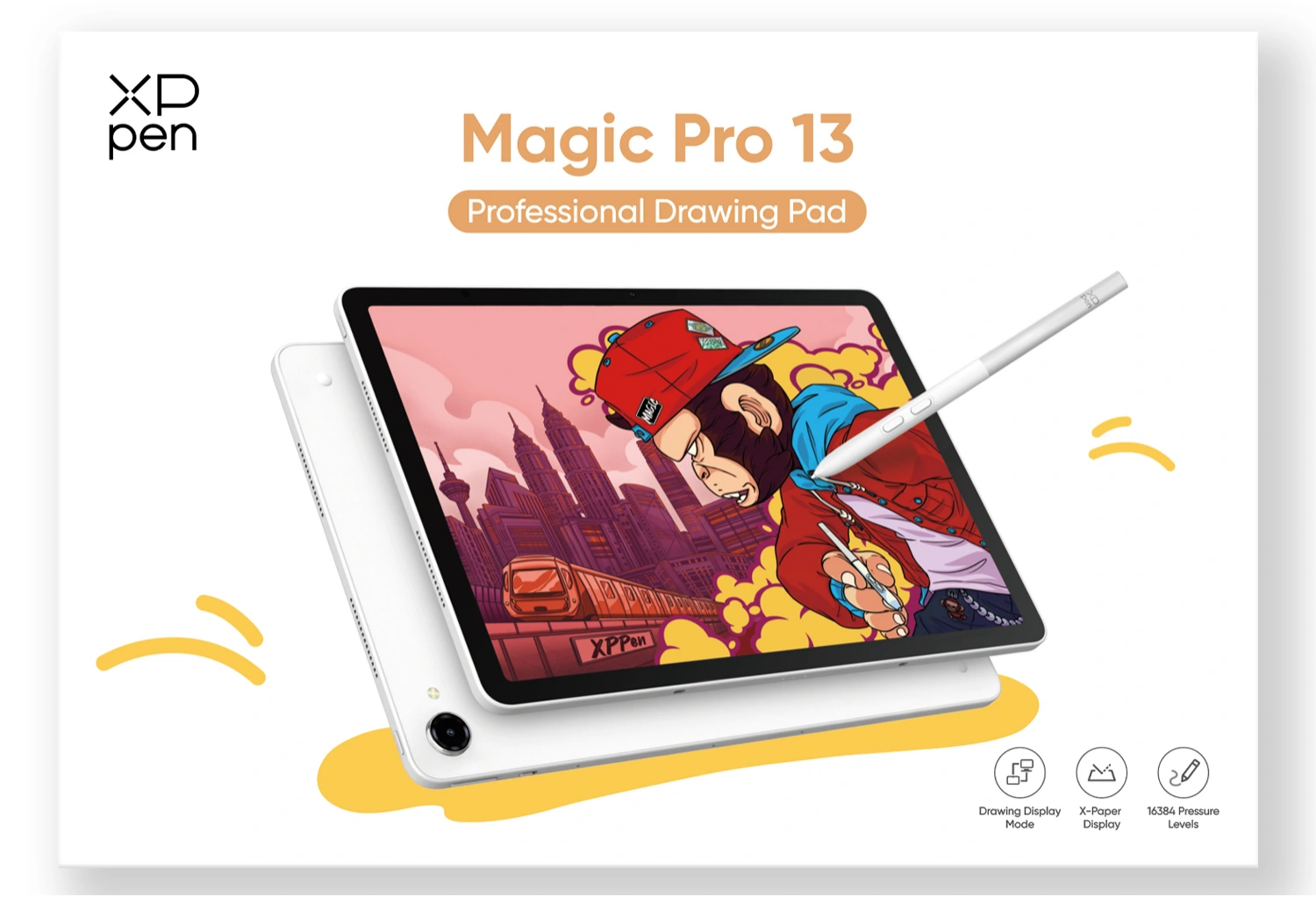
Key Specifications:
- Features a 12.95 Inch 3K (3096 x 2064) 3:2 paper-like display at 120Hz refresh rate
- MediaTek Dimensity 8300 processor (4nm)
- 8GB RAM with 256GB storage (expandable to 2TB)
- X4 Smart Chip Stylus with 16384 pressure levels and 2g initial activation force
- 10200 mAh battery with 45W PD fast charging
- Weighs 1.44 lbs (655g)
Our Review:
It functions as an independent Android 16 standalone drawing pad for sketching on the go and transforms into a professional 3K 120Hz PC drawing display using a single USB-C cable. If drawing is your focus and you need a device built specifically for that purpose, this is your best bet for top-notch creativity.
Buy if:
- You want a dedicated paper-like etched screen with 16K pressure levels and dual-mode PC display functionality.
- You need professional color coverage (100% sRGB, 96% DCI-P3) and pre-installed creative software suites.
- You prefer a specialized art-first device over a general consumer media tablet.
Don’t buy if:
- You only need a basic tablet for casual media streaming and light browsing.
- You prefer using a native desktop operating system like Windows or macOS as your primary tablet OS.
Conclusion
Choosing the best Samsung tablet for drawing comes down to matching canvas size, processing power, and display tech to your budget and workflow requirements. If you demand a giant studio display with maximum color precision, the Galaxy Tab S9 Ultra or Tab S11 Ultra offers an incredible AMOLED canvas. For artists seeking balanced mobility, the Galaxy Tab S10+ delivers flagship power in an easily portable size. Beginners and art students can turn to the Galaxy Tab S6 Lite (2024 Edition) to build skills without overspending.
Alternatively, if you prefer an art-first device engineered with a paper-like etched surface, 16K pressure sensitivity, and dual-mode PC display functionality, purpose-built options like the XPPen Magic Pro 13 standalone drawing Pad provide a specialized solution tailored for digital creators.

Basanti Brahmbhatt
Basanti Brahmbhatt is the founder of Shayaristan.net, a platform dedicated to fresh and heartfelt Hindi Shayari. With a passion for poetry and creativity, I curates soulful verses paired with beautiful images to inspire readers. Connect with me for the latest Shayari and poetic expressions.